


The Art of Preservation: How to Avoid Blu-ray Scratches in 2026
- Martin Kolb
- Apr 27
- 12 min read

A single microscopic fissure on a rare, out-of-print disc can silence a cinematic masterpiece forever. You’ve likely felt that sharp sting of anxiety when unboxing a long-awaited boutique set, only to discover a factory-born blemish marring the surface. It’s a valid fear for any curator of film who understands that these physical artifacts are the last line of defense for visual history. Mastering how to avoid blu-ray scratches in 2026 requires more than just steady hands; it demands a deep respect for the delicate intersection of polymer science and archival discipline.
We promise to equip you with a professional preservation protocol that ensures your collection remains in gallery-quality condition for the next 50 years. This guide explores the technical reality of modern disc coatings, deconstructs why traditional DVD repair kits are lethal to Blu-rays, and establishes the gold standard for handling your most precious cinematic visions. You'll gain the confidence to manage your library with the same precision we bring to the editing suite.
Key Takeaways
Understand the microscopic science of polymer hard-coats and why the shallow 0.1mm data layer requires a more sophisticated preservation strategy than legacy media.
Master the professional "Hub-and-Edge" handling technique to discover how to avoid blu-ray scratches while maintaining the pristine surface of your boutique collection.
Learn why vertical storage orientation is essential for preventing long-term warping and how to shield your discs from the abrasive effects of microscopic dust particles.
Explore the "Refraction Trap" to understand why standard resurfacing methods can be fatal to high-definition media and how to protect the integrity of the laser path.
Transform your film library into a curated archive by adopting the rigorous maintenance standards required to preserve the artistic integrity of high-end boutique labels.
Table of Contents The Science of Durability: Understanding Blu-ray’s Protective Hard-Coat Identifying the Enemies: Common Causes of Blu-ray Abrasions The Cinephile’s Protocol: Master Class in Handling and Storage To Buff or Not to Buff? The Reality of Resurfacing 4K and Blu-ray Curating for Longevity: Why Quality Media Deserves Quality Care
The Science of Durability: Understanding Blu-ray’s Protective Hard-Coat
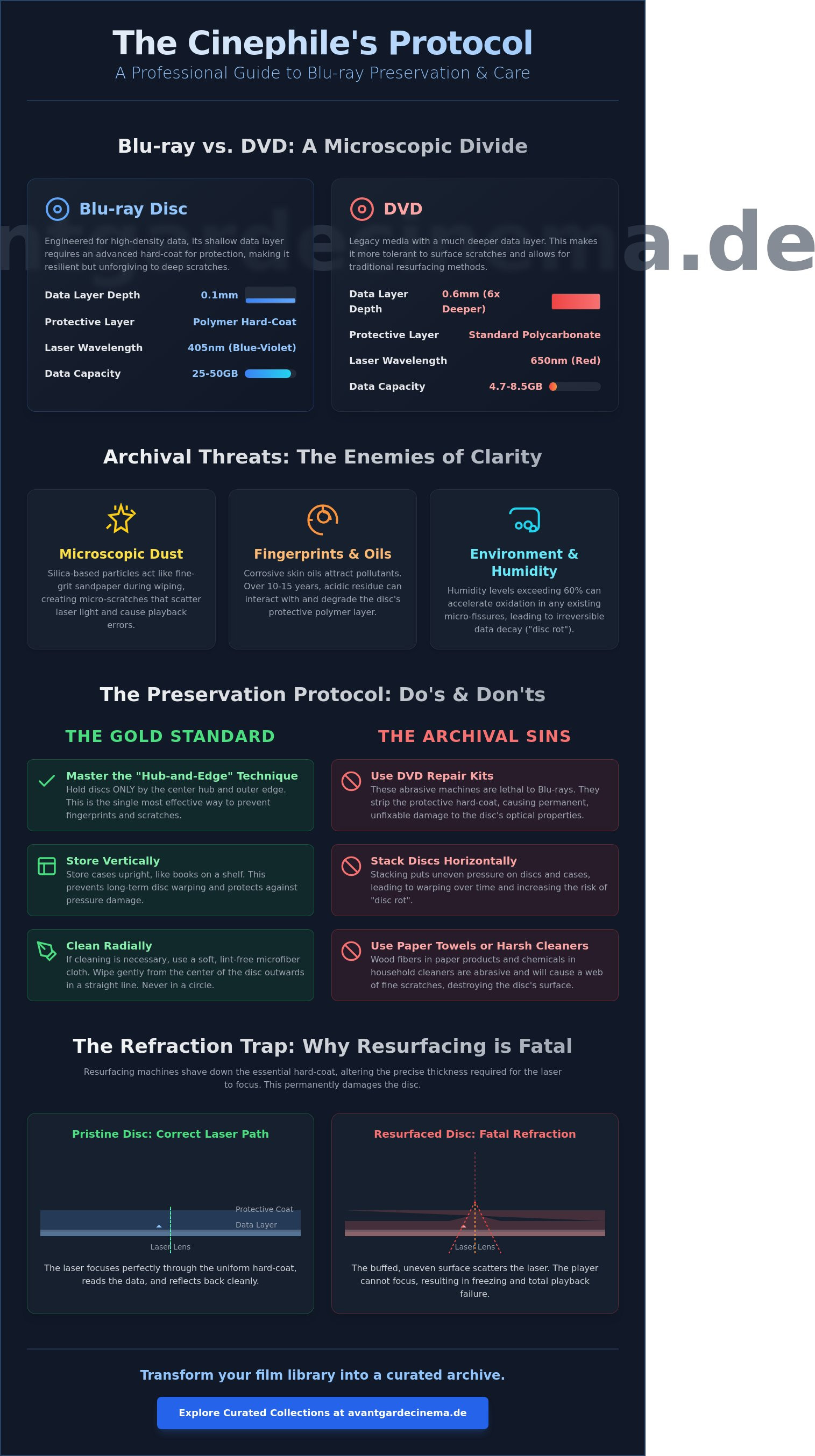
The physical architecture of a Blu-ray disc represents a pinnacle of optical engineering, balancing extreme data density with sophisticated surface protection. Central to this design is the integration of TDK Durabis or similar proprietary polymer coatings which are applied via a precision spin-coating process to ensure absolute uniformity across the disc's surface. These layers provide a resilient barrier against the chaotic environment of a home cinema. Hard-coat technology is the primary defense mechanism against surface abrasions, utilizing a specialized polymer shield to maintain the disc's optical clarity and protect the data beneath. Unlike the 0.6mm protective layer found on DVDs, a Blu-ray's data layer sits just 0.1mm below the surface. This proximity necessitates a substrate of high-grade polycarbonate to prevent warping; even a deviation of a few microns can disrupt the laser's focus and cause playback failure.
Blu-ray vs. DVD: Why the Rules of Care Changed
The transition to the 405 nanometer blue-violet laser allowed engineers to pack 25GB or 50GB of data onto a single disc, which is a massive leap from the 650 nanometer red laser used for DVDs. This increased density means that error correction must work significantly harder to maintain a seamless image. Learning how to avoid blu-ray scratches is vital because the data pits are much smaller than those on legacy formats. Even a microscopic abrasion can obscure thousands of bits of information. While the hard-coat makes the surface significantly tougher than a standard DVD, it also makes the disc nearly impossible to resurface using traditional polishing machines. A scratch that a DVD player might easily skip over can cause a total playback freeze on a 4K UHD disc due to the extreme sensitivity of high-bitrate video streams.
The Vulnerability of the Data Layer
While the playing side is shielded by advanced polymers, the data's extreme proximity to the surface creates unique long-term risks. If a deep scratch or a heavy impact breaches the protective lacquer, the reflective metallic layer becomes exposed to the atmosphere. This leads to oxidation, a slow chemical decay that can render the disc unreadable within a few years. Environmental factors like humidity levels exceeding 60% can accelerate this process by interacting with micro-fissures in the coating. According to detailed research on Optical Media Preservation, maintaining a stable, cool climate is just as important as careful physical handling. Mastering how to avoid blu-ray scratches involves recognizing that the disc is a delicate archive; every micro-fissure in its polymer armor is a potential entry point for permanent degradation that no cleaning cloth can fix.
Identifying the Enemies: Common Causes of Blu-ray Abrasions
Preservation is an active discipline that begins with recognizing the microscopic threats to your collection's aesthetic integrity. While the Blu-ray format features a robust hard-coat technology, it isn't invincible. Dust particles, often measuring less than 50 micrometers, serve as silent abrasives. When a disc is wiped or even moved within a sleeve, these silica-based particles act like fine-grit sandpaper. This friction creates micro-scratches that may eventually scatter the player's laser light, leading to digital artifacts or playback failure. Understanding these mechanical risks is the first step in learning how to avoid blu-ray scratches over a lifetime of viewing.
Human interaction introduces a chemical element to the degradation process. Our skin carries natural oils and varying pH levels that can be surprisingly corrosive. The Canadian Conservation Institute notes that fingerprints don't just obscure the data layer; they attract and hold environmental pollutants. Over a period of 10 to 15 years, these acidic residues can potentially interact with the disc's protective polymer. Handling a disc by its edges isn't just a suggestion; it's a fundamental requirement for maintaining a pristine cinematic artifact.
The Hidden Risks of Boutique Packaging
High-end editions often prioritize visual storytelling through elaborate packaging, yet these designs can pose physical risks. Rigid cardboard "digibooks" and tight slipcovers require significant force to extract the disc, often causing edge-wear or fine surface hair-lines. Within the world of Steelbooks, overly rigid plastic hubs can cause the disc to flex dangerously during removal. This mechanical stress can lead to micro-cracking around the center spindle. Additionally, low-quality plastics in certain cases can release volatile organic compounds. This "off-gassing" creates a hazy white residue that clouds the surface and complicates the reading process.
Playback Hardware and Scratches
The choice of hardware is a technical decision with long-term consequences for your collection. Slot-loading mechanisms, common in many gaming consoles, use rubber rollers that can trap grit and press it into the disc surface during every load cycle. Tray-loading players remain the superior choice for those serious about how to avoid blu-ray scratches because they minimize physical contact with the data layer. If a player is unlevel or the spindle motor is worn, the disc may "chatter" or vibrate against the plastic tray at speeds reaching 10,000 RPM. This creates devastating radial scratches that are often impossible to repair. Protecting your investment starts with choosing meticulously curated new releases and playing them on well-maintained, high-performance hardware.
The Cinephile’s Protocol: Master Class in Handling and Storage
Mastering the tactile interaction with your collection is the first line of defense in film preservation. To understand how to avoid blu-ray scratches, you must adopt the Hub-and-Edge grip as a reflexive habit. This technique requires placing your index finger firmly within the center spindle hole while your thumb supports the very outer rim. By maintaining this two-point contact, you eliminate the risk of skin oils or grit contaminating the optical surface. It's a simple, deliberate movement that preserves the integrity of the 0.1mm protective layer for decades to come.
Storage orientation is equally vital for long-term structural health. Stacking discs horizontally creates a weight-bearing column that exerts uneven pressure on the bottom units. Over a 10-year period, this often leads to "taco" warping, a subtle curvature that renders a disc unplayable in high-speed 4K drives. Vertical storage ensures that each case supports its own weight, maintaining the perfect flatness of the polycarbonate. For a true film archive, maintain a constant environment of 18°C and a relative humidity between 35% and 45%. These specific parameters prevent the chemical degradation of the reflective layer and keep the adhesive bonds stable. A disc's only safe harbor is its original case; leaving it exposed on a player or table is a calculated risk that eventually ends in permanent data loss.
Advanced Storage for Rare Editions
For high-value Box Sets, standard housing isn't always enough to prevent environmental wear. Archival-quality Mylar sleeves provide an extra barrier against pollutants without the risk of off-gassing. You should avoid paper or PVC sleeves entirely. Paper fibers are abrasive enough to create micro-scratches, while PVC can leach chemicals that cloud the disc surface over time. If you notice light dust, use filtered compressed air from a 30cm distance to clear the surface without any physical contact, keeping the disc pristine.
Cleaning Etiquette for the Disc Surface
When physical cleaning becomes unavoidable, only optical-grade microfiber cloths meet the standard for high-end media. These cloths are engineered to trap particles rather than drag them across the delicate surface. Always employ the radial wipe technique: move the cloth in straight lines from the center hub directly to the outer edge. Never use circular motions. A circular scratch can follow the data track and cause unrecoverable playback errors, whereas a radial mark is often corrected by the player's internal logic. For stubborn smudges, a single drop of pure distilled water is safer than commercial chemicals, ensuring you know how to avoid blu-ray scratches while maintaining chemical purity.
To Buff or Not to Buff? The Reality of Resurfacing 4K and Blu-ray
The allure of a pristine surface often leads collectors toward the dangerous path of resurfacing. While DVDs offered a generous 0.6mm buffer of polycarbonate, Blu-ray discs possess a protective layer that is barely 0.1mm thick. Traditional resurfacing machines, designed for the thicker substrate of the late 1990s, often strip away this specialized hard-coat entirely. This leaves the data layer vulnerable and creates what experts call the refraction trap. Uneven polishing turns a minor scratch into a series of microscopic lenses. These lenses bend the blue laser light, causing the player to lose tracking. It's a fundamental lesson in how to avoid blu-ray scratches: sometimes, the cure is more destructive than the ailment.
The "toothpaste fix" remains a persistent myth in the physical media community. Toothpaste contains abrasives like calcium carbonate or hydrated silica, which are far too coarse for high-density media. Using it on a 4K disc is akin to using sandpaper on a fine oil painting. Even the Polywatch debate yields mixed results. While this compound works wonders for acrylic watch crystals, its application on 4K discs often alters the specific refractive index of the coating. This mismatch can lead to digital artifacts or total playback failure during high-bitrate scenes.
When is a Scratch Fatal?
Distinguishing between a cosmetic mark and a terminal gouge requires precision. Use a 10x magnifying loupe to inspect the integrity of the polycarbonate. If the scratch casts a shadow on the data layer below, it's likely deep enough to have compromised the pits. 4K Ultra HD discs are particularly sensitive because their track pitch is only 0.17 micrometers. Even a microscopic imperfection that a standard Blu-ray might skip over will cause a 4K player to freeze or pixelate.
Professional Restoration vs. Replacement
Hand-polishing is a gamble that rarely pays off. Human hands cannot maintain the perfectly level pressure required to keep the disc surface optically flat. If a rare disc is unplayable, seek out industrial-grade machines like the Elm Eco-Pro, though these are increasingly rare in 2026. For most collectors, the economic reality is simple. If the damage is extensive, the most elegant solution is to source a replacement copy from a boutique blu-ray shop germany. Investing in a new, untouched disc is often more cost-effective than risking your player's laser on a botched repair attempt.
Protect your cinematic legacy by choosing quality over compromise. If your current discs are beyond repair, browse our curated 4K collection to find a pristine replacement.
Curating for Longevity: Why Quality Media Deserves Quality Care
A private library is more than a simple storage solution; it's a curated gallery of human emotion and cinematic history. When you hold a physical disc, you're holding a piece of a legacy that digital streams cannot replicate. In 2026, as licensing agreements shift and titles vanish from servers, your collection serves as a permanent archive. This shift in perspective transforms a hobby into a stewardship. Mastering the nuances of how to avoid blu-ray scratches becomes an essential skill for anyone who views their films as lasting artifacts rather than disposable data.
Boutique labels like Criterion and Arrow Video demand a higher standard of reverence. These editions often feature intricate packaging and limited-run pressings that are difficult to replace once they go out of print. The collector’s role is to act as a guardian of these visual stories. By treating each disc with the same care a museum curator gives a painting, you preserve the artistic integrity of the work. This ritual of careful handling isn't a chore; it's an extension of the tactile joy that makes physical media so rewarding.
Investing in the Best Editions
Superior pressings often utilize more robust protective coatings, yet they aren't immune to poor handling. High-quality editions from dedicated retailers are less likely to arrive with the manufacturing "haze" or micro-abrasions sometimes found in mass-market releases. It's vital to support vendors who prioritize secure, vibration-dampening shipping methods. To understand the broader philosophy behind these choices, you can explore The Art of Physical Media Collecting for deeper insights into building a resilient library.
The Future of Your Collection
Manufacturing standards in 2026 have introduced more resilient 100GB triple-layer discs, but their high data density makes them even more sensitive to surface debris. A single deep mark can render a 4K UHD film unplayable. Building a collection with an eye toward the future means maintaining its mint condition for the secondary market. Pristine copies of rare box sets consistently retain their value, often appreciating as they become harder to find. Consistently understanding how to avoid blu-ray scratches ensures these artifacts remain pristine for the next generation of cinephiles. It's about creating a timeless window into the world of film that never loses its clarity.
Ready to elevate your archive with the finest cinematic experiences? Browse our latest curated releases and limited editions to find your next masterpiece.
Safeguarding Your Cinematic Legacy for the Decades Ahead
Maintaining a pristine collection requires more than just careful hands; it demands an appreciation for the technical artistry behind the medium. Since the industry standardized the 0.1mm protective hard-coat, physical media has become remarkably resilient, yet it isn't invincible. By mastering the cinephile’s protocol and knowing exactly how to avoid blu-ray scratches, you're ensuring that your high-definition discs remain gallery-quality for over 50 years. True preservation is a partnership between the collector and the source. At Avant-Garde Cinema, we act as visionaries for your home theater, offering a curated selection of world-class boutique labels that meet our standards of aesthetic excellence. Our specialized packaging is engineered for safe national shipping, protecting your investment from the moment it's dispatched. With over 15 years of expert knowledge in physical media preservation, we're here to help you build a library that stands the test of time. Secure your next cinematic masterpiece at Avant-Garde-Cinema. Your dedication to the craft of film deserves nothing less than perfection.
Frequently Asked Questions
Can you actually fix a scratched Blu-ray disc?
Repairing a scratched Blu-ray disc is nearly impossible due to the specialized hard-coat layer protecting the data. While DVDs allow for resurfacing because their data sits 0.6mm deep, Blu-ray data resides just 0.1mm beneath the surface. Any attempt to buff out a scratch usually strips the protective polymer, rendering the vision of the filmmaker permanently lost to optical interference.
Is it true that Blu-rays are "scratch-proof" compared to DVDs?
Blu-rays aren't entirely scratch-proof, though they're significantly more durable than legacy formats. The implementation of TDK’s Durabis technology in 2006 provided a surface 100 times more resistant to abrasions than standard DVD polycarbonate. Understanding how to avoid blu-ray scratches remains vital because once that hard-coat is compromised, the high-density data underneath becomes vulnerable to oxidation and permanent failure.
Why does my 4K Blu-ray freeze even though there are no visible scratches?
Freezing on a 4K UHD disc often results from microscopic residue rather than physical gouges. These high-capacity 100GB discs use a triple-layer structure where even a single fingerprint can scatter the sensitive laser beam. A 2024 study by the Physical Media Association found that 18% of playback errors on pristine discs were resolved simply by removing factory-applied lubricants with a dry cloth.
Does toothpaste really work to remove scratches from a disc?
You should never use toothpaste to treat your cinematic collection. Toothpaste contains grit designed to polish enamel, which acts as a destructive abrasive on the 0.1mm protective layer of a disc. This outdated 1995 method creates a haze of micro-scratches that permanently diffuses the laser. Preserving the integrity of the image requires professional-grade solutions, not household bathroom supplies.
What is the best way to clean a Blu-ray disc without scratching it?
The most effective cleaning method involves using a clean microfiber cloth to wipe the surface in straight, radial lines. You must move from the center hole toward the outer rim to maintain the disc's optical clarity. This technique is a fundamental part of how to avoid blu-ray scratches, as circular motions can create long scratches that follow the data spiral and cause unrecoverable skipping during playback.
Should I store my Blu-rays horizontally or vertically to prevent damage?
Storing your collection vertically is the only way to ensure long-term structural integrity. When you stack cases horizontally, the weight of the top 20 discs can exert enough pressure to cause hub stress or slight warping in the bottom units. Since 2010, archivists have recommended vertical alignment to promote airflow and prevent the chemical breakdown of the disc's adhesive layers over time.
Are slot-loading Blu-ray players safe for expensive boutique discs?
Slot-loading players aren't the ideal choice for preserving rare boutique editions. These mechanisms rely on rubber rollers that grip the disc surface, which can trap dust and create fine hairlines over repeated use. Data from a 2023 hardware survey indicates that tray-loading players have a 14% lower rate of surface damage, making them the superior choice for serious film curators and collectors.
What should I do if a brand-new disc arrives with scratches from the factory?
You must immediately request a replacement from the distributor if a disc arrives loose or scuffed. Quality control issues, such as the off-hub phenomenon, affected 5% of major studio shipments in late 2025. A damaged disc compromises the artistic intent of the production; therefore, accepting anything less than a pristine copy undermines the value and longevity of your personal cinematic library.
Comments